UTC Time Monitoring
Why time accuracy matters
Digital television networks carry the current time in TDT (Time and Date Table) and TOT (Time Offset Table) tables within the transport stream. Subscriber devices use this information to display the current time on screen, show EPG entries for the correct time slot, and trigger scheduled recordings at the right time.
How TS Analyzer monitors UTC
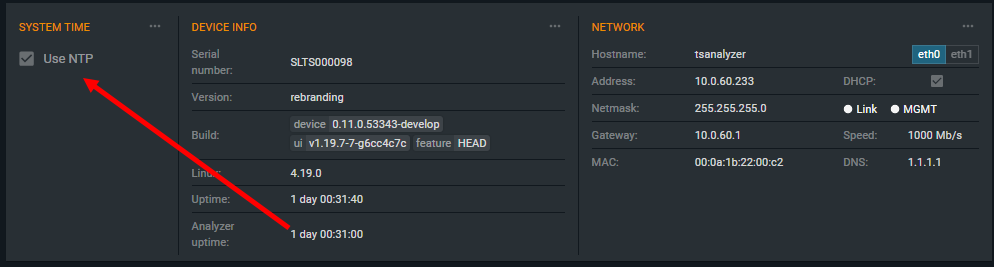
TS Analyzer must be synchronized to an accurate time source before it can monitor TS time accuracy. Enable NTP synchronization in Settings → System Time (see Device Settings).
To enable NTP synchronization from the monitoring interface:
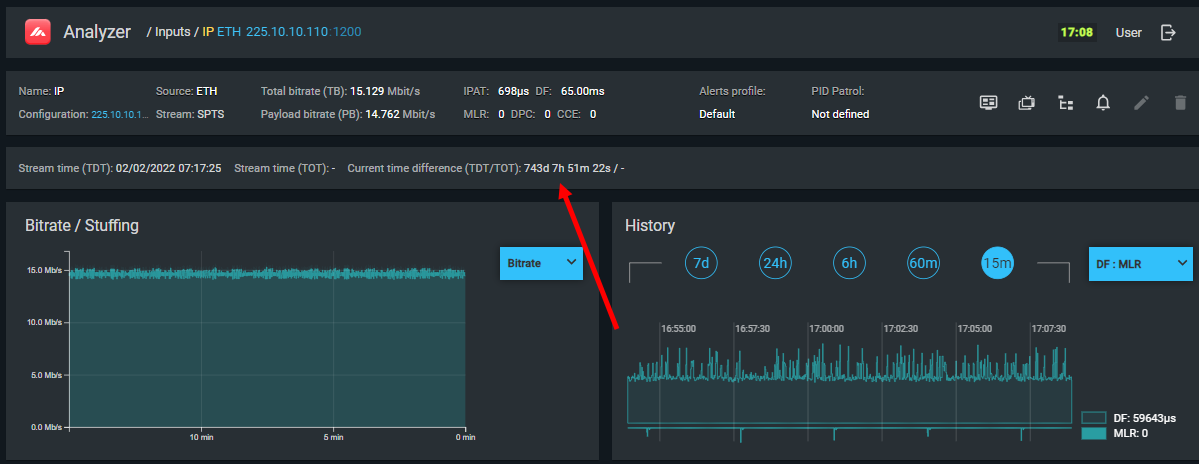
Once synchronized, the analyzer compares the time embedded in TDT/TOT tables against its own NTP-synchronized clock and displays the difference. A deviation near zero confirms that the multiplexer's clock is correctly set and that TDT/TOT are being transmitted accurately.
Common causes of time deviation
| Cause | Typical deviation |
|---|---|
| Incorrect timezone or DST setting in the multiplexer | Exactly ±1 hour or a round number of hours |
| Multiplexer's internal clock drifting without NTP | Gradual, slowly increasing deviation |
| Stream is a pre-recorded playout being replayed in a loop | Large, fixed offset (e.g., hundreds of days) |
| Satellite or relay path adds propagation delay | Small, roughly constant offset (milliseconds to seconds) |
| Retransmission of a stream from a different timezone without updating TOT | Exactly ±N hours |
Diagnosing a looped playout
If the time deviation is very large (many days or months) and CCE errors appear at regular intervals, the stream is likely a recorded TS being played back in a loop. The periodic CCE errors correspond to the loop boundary where the playback restarts. This is useful to know when investigating a stream that is supposed to be live but is actually playing pre-recorded content.
Correct monitoring setup
For meaningful UTC deviation readings:
- Ensure TS Analyzer is synchronized via NTP to a reliable time source.
- Verify the correct timezone is configured on the analyzer.
- Ensure the TS includes TDT or TOT tables — if the multiplexer is not configured to transmit them, the deviation display will show no data and a TDT_error will be active (see 3.8 TDT_error).
Recommendations for resolving time errors
- Verify NTP is configured and working on the multiplexer (or PSI/SI generator if separate).
- Check the timezone setting in the multiplexer matches the intended broadcast region.
- If the multiplexer uses an external time reference (GPS, GLONASS), verify the reference is locked and operational.
- If a stream is being retransmitted from a satellite with a different timezone offset, ensure the TOT table is being updated to reflect the correct local time offset before retransmission.