Output signals (Outputs)
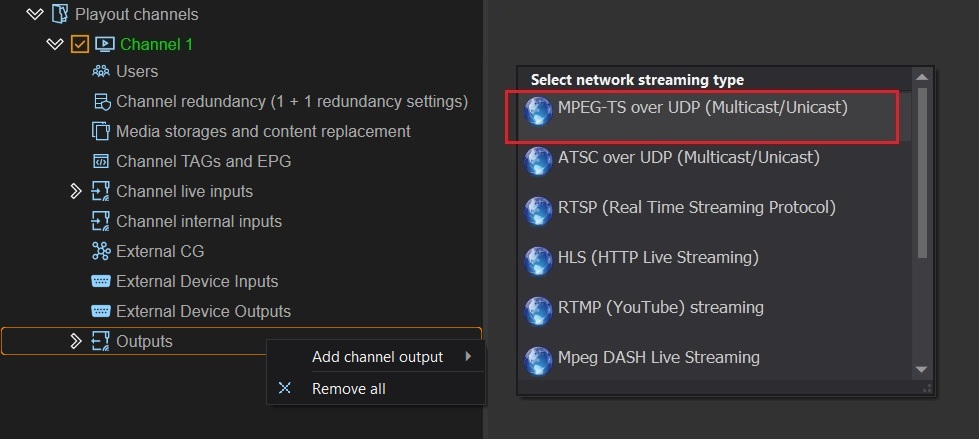
VPlay includes a built-in IP streaming stack — no external encoders are needed. All outputs are added in vpControl → Channel → Outputs → Add channel output.
Outputs are divided into three groups: - IP — UDP, RTSP, SRT (transport streams) - Internet — HLS, RTMP, MPEG-DASH (internet broadcasting) - AV — SDI, NDI (professional equipment)
Common encoding parameters
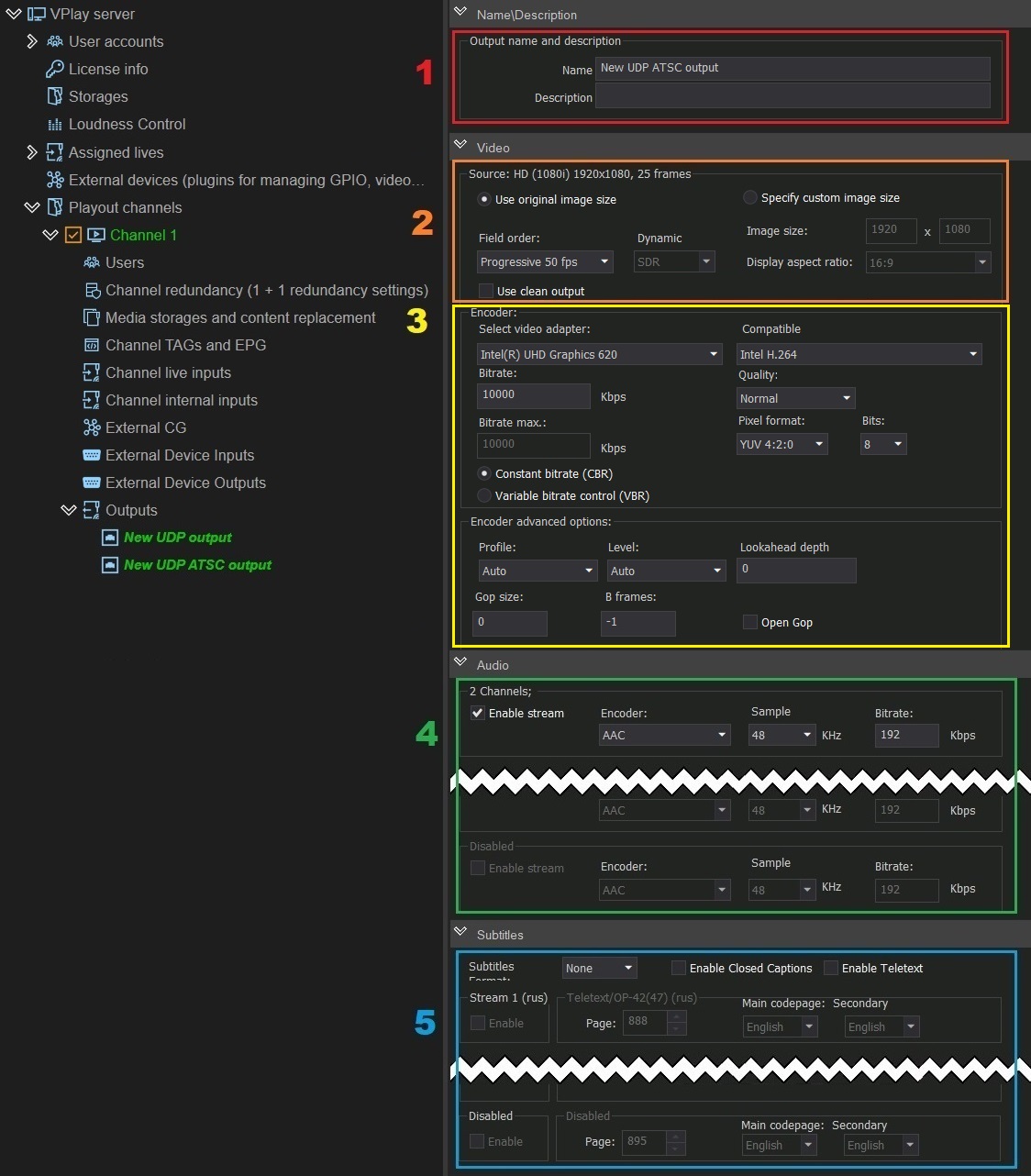
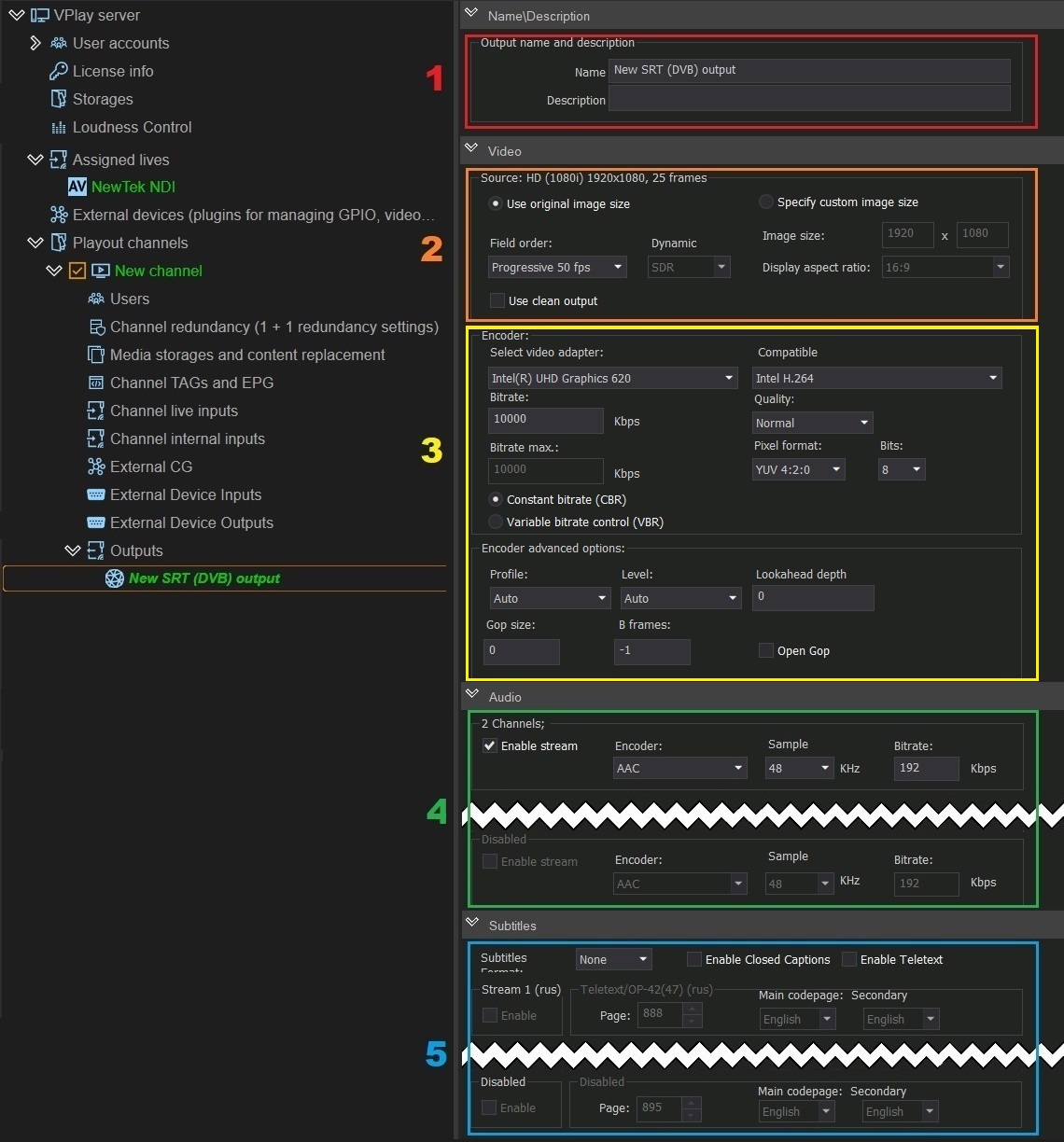
Most IP outputs have the same settings sections. They are described once here; the sections below list only the differences.
Video panel — Source
| Parameter | Description |
|---|---|
| Use original image size | Size and aspect ratio remain unchanged. Field order becomes available: Progressive 50fps / Progressive 25fps / Top field first |
| Specify custom image size | Enter the resolution and aspect ratio (4:3 / 16:9) manually |
| Use clean output | Output signal without graphics overlay. This setting is duplicated in the channel settings — if it is enabled in both places, all graphics are ignored |
| Dynamic Range | SDR or HDR HLG color space (available only if the channel is configured for HDR HLG) |
Video panel — Encoder
VPlay has built-in protection: when you select a GPU, only compatible codecs are shown. Incompatible parameters are blocked automatically.
| Parameter | Description |
|---|---|
| Select video adapter | GPU for encoding: NVIDIA (NVENC), AMD (AMF), Intel Arc (QSV), or Software renderer (CPU) |
| Compatible | List of codecs for the selected adapter. Only compatible codecs are listed |
| Bitrate | CBR (Constant) — 10,000 Kbit/s by default. VBR (Variable) — with a peak value limit (the Bitrate max field) |
| Quality | Speed / Normal / High Quality / Very High Quality |
| Pixel format | YUV 4:2:0 / 4:2:2 / 4:4:4 |
| Bits | 8 / 10 / 16 bit. 8 bit is the standard. 10 bit is normal for HEVC. When you increase the bit depth, increase the bitrate as well |
Advanced codec parameters
| Parameter | Description |
|---|---|
| Profile | Auto / Simple / Main / High. Simple — for mobile devices, Main — DVB SD, High — DVB HD, Blu-Ray |
| Level | Decoder level (determines the maximum resolution and bitrate of the receiver) |
| Lookahead depth | Look-ahead analysis buffer of 0–32 frames. Increases latency and memory consumption. HEVC — yes, MPEG-2 — no |
| GOP size | Distance between keyframes. 2 seconds by default. A large GOP gives better compression, but the receiver takes longer to decode |
| B-frames | Bidirectional frames. -1 = automatic. Change only if you know the compression standard |
| Open GOP | More efficient compression, but playback cannot start from a keyframe (artifacts will appear). Disabled by default |
GOP size and decoding delay
With a GOP size of 250 frames (25fps), the receiver may wait up to 10 seconds before the first decoding. For live broadcasts, use a GOP of 2–4 seconds.
Audio panel
Up to 8 stereo pairs per output. For each pair, independently:
- Codec: AAC, MPEG-1 Layer II, MPEG-2 Layer II, AC-3 (ATSC A/52A)
- Sample rate: 48 kHz or 44.1 kHz
- Bitrate: set manually
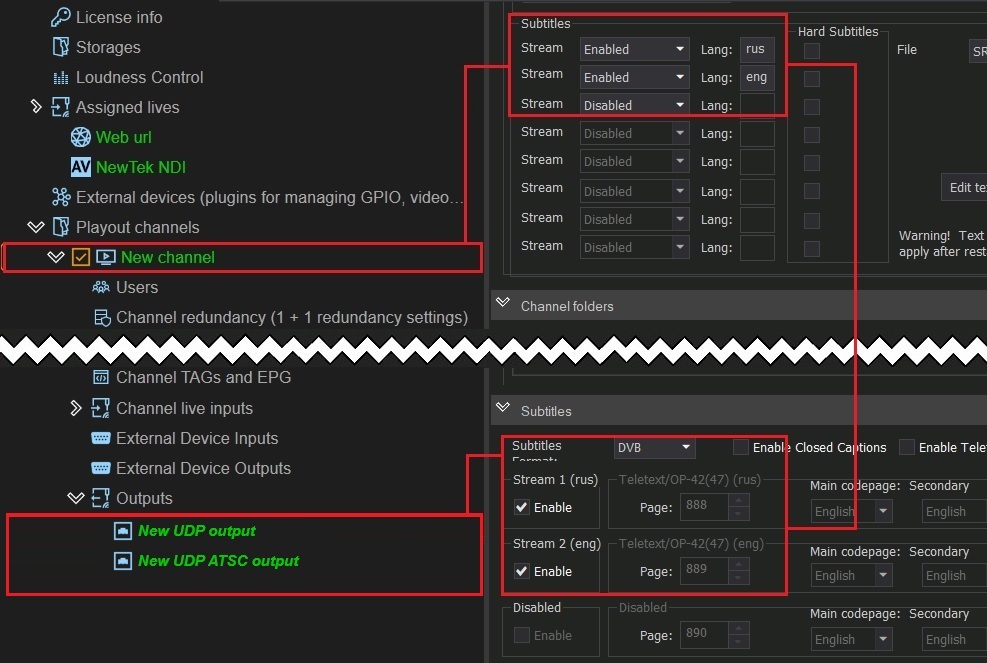
Subtitles panel
Up to 8 subtitle tracks per output stream (the number is determined by the channel settings).
- Subtitles Format: None / DVB / EBU-TT → select the required tracks using the checkboxes
- Enable Closed Captions → enable the closed caption tracks
- Enable Teletext → enable the teletext tracks → for each one, specify the page (888 by default) and the language
Adding: Add channel output → MPEG-TS over UDP (Multicast/Unicast)
After the output is created, the settings panel opens:
Broadcasting over IP networks in MPEG Transport Stream format. Supports unicast and multicast.
Adding: Add channel output → MPEG-TS over UDP (Multicast/Unicast)
For ATSC: Add channel output → ATSC over UDP
Specific parameters:
- Field order (default): MPEG-TS — Top field first; ATSC — Progressive 50fps
Muxer panel — MPEG-TS
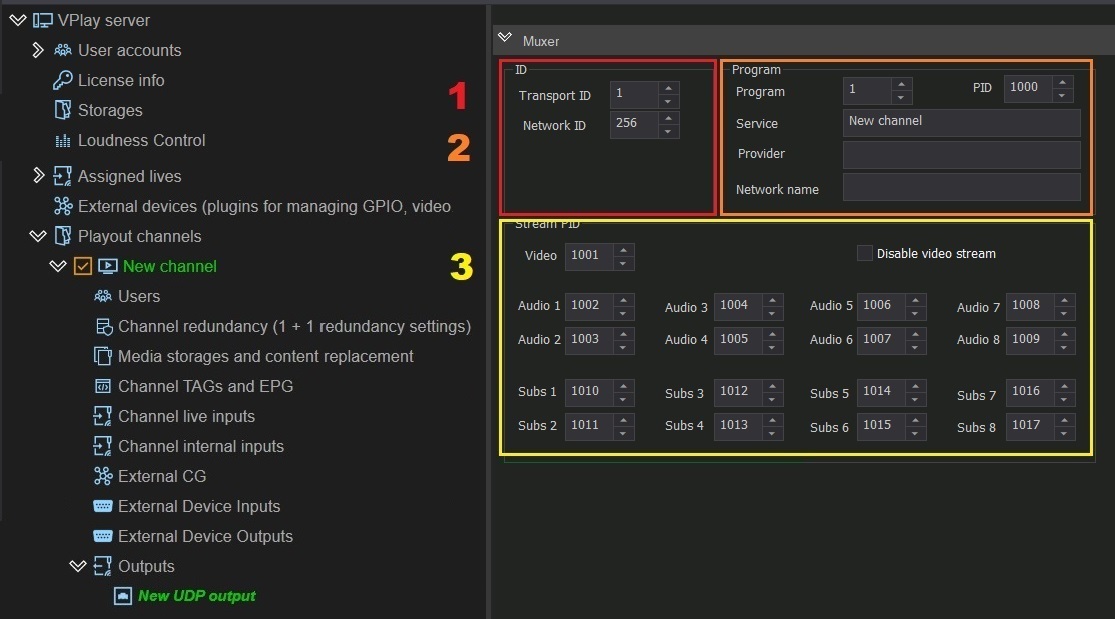
| Group | Parameters |
|---|---|
| ID | Transport ID, Network ID |
| Program | Program number, PID, Service name, Provider name, Network name |
| Stream PID | Video, audio, and subtitle PIDs. Disable video stream — audio/service data only. Do not change unless necessary! |
| SCTE-35 Stream | Enable Stream + PID (do not change the default) |
| Teletext Stream | Enable Stream + PID (do not change the default) |
| EPG text encoding | EPG encoding (UTF-8 by default) |
| Strict CBR Multiplexing | Constant stream rate mode + Minimum field |
Muxer panel — ATSC
Differences from MPEG-TS:
| Parameter | Description |
|---|---|
| Major CH / Minor CH | Numbering of digital subchannels |
| Type | Terrestrial or Cable |
Destination (Interface, host, port)
- Interface — a network interface from the list of interfaces available in the system
- Destination host, port — IP address and port of the receiver. Multicast (
239.x.x.x) and unicast are supported
RTSP
Adding: Add channel output → RTSP
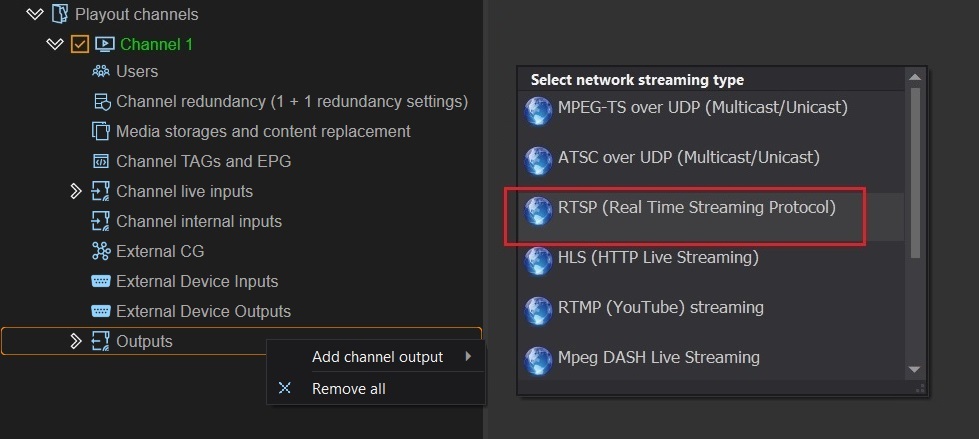
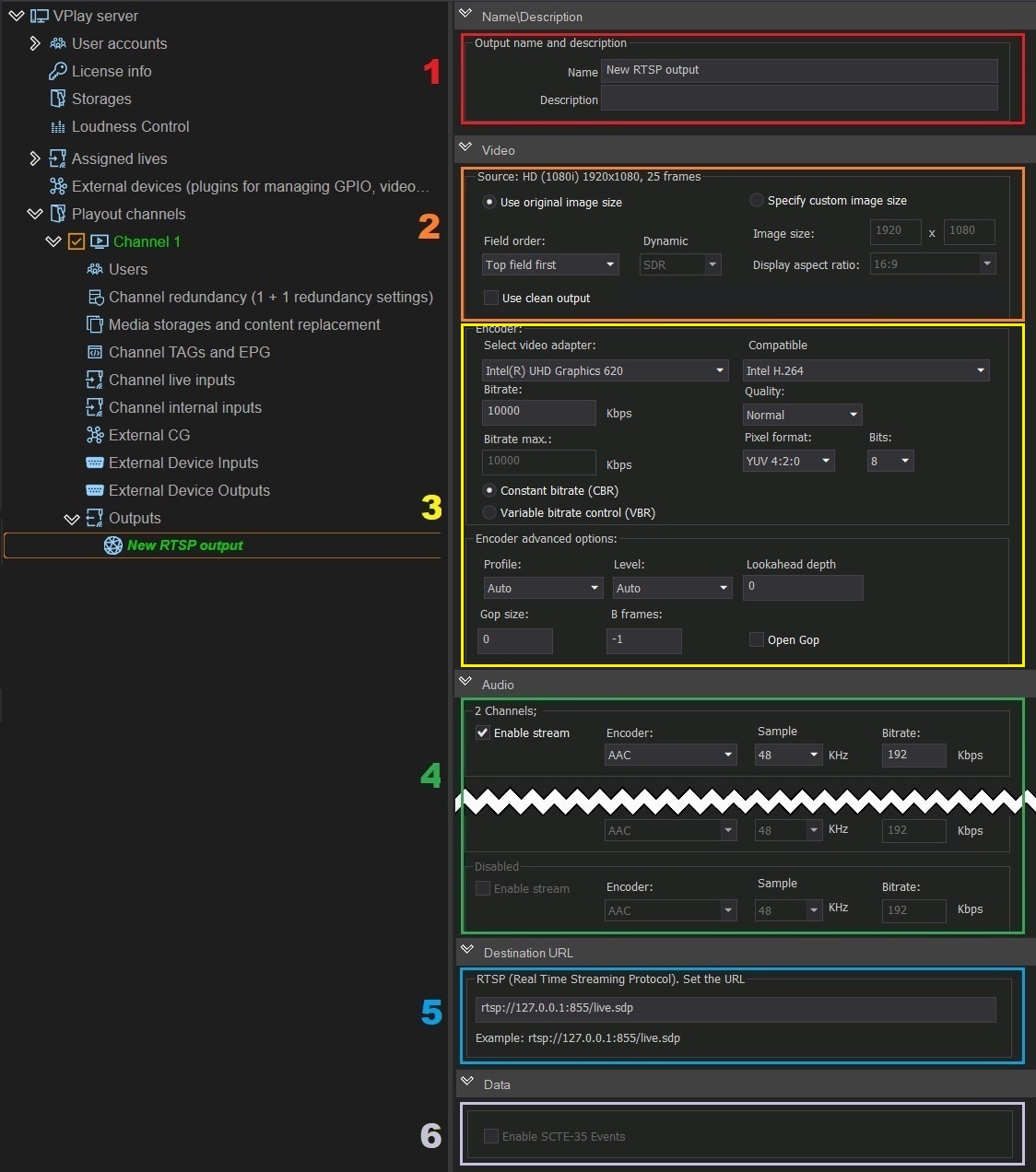
Adding: Add channel output → RTSP (Real Time Streaming Protocol)
The encoding parameters are common (see above). Default field order: Top field first.
Destination URL: the RTSP(Real Time Streaming Protocol). Set the URL field — the stream URL is generated automatically from the server IP address and the stream name.
HLS
Adding: Add channel output → HLS
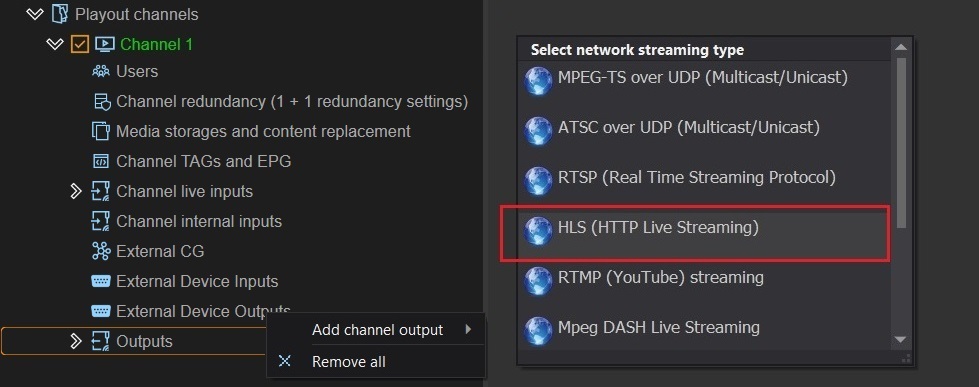
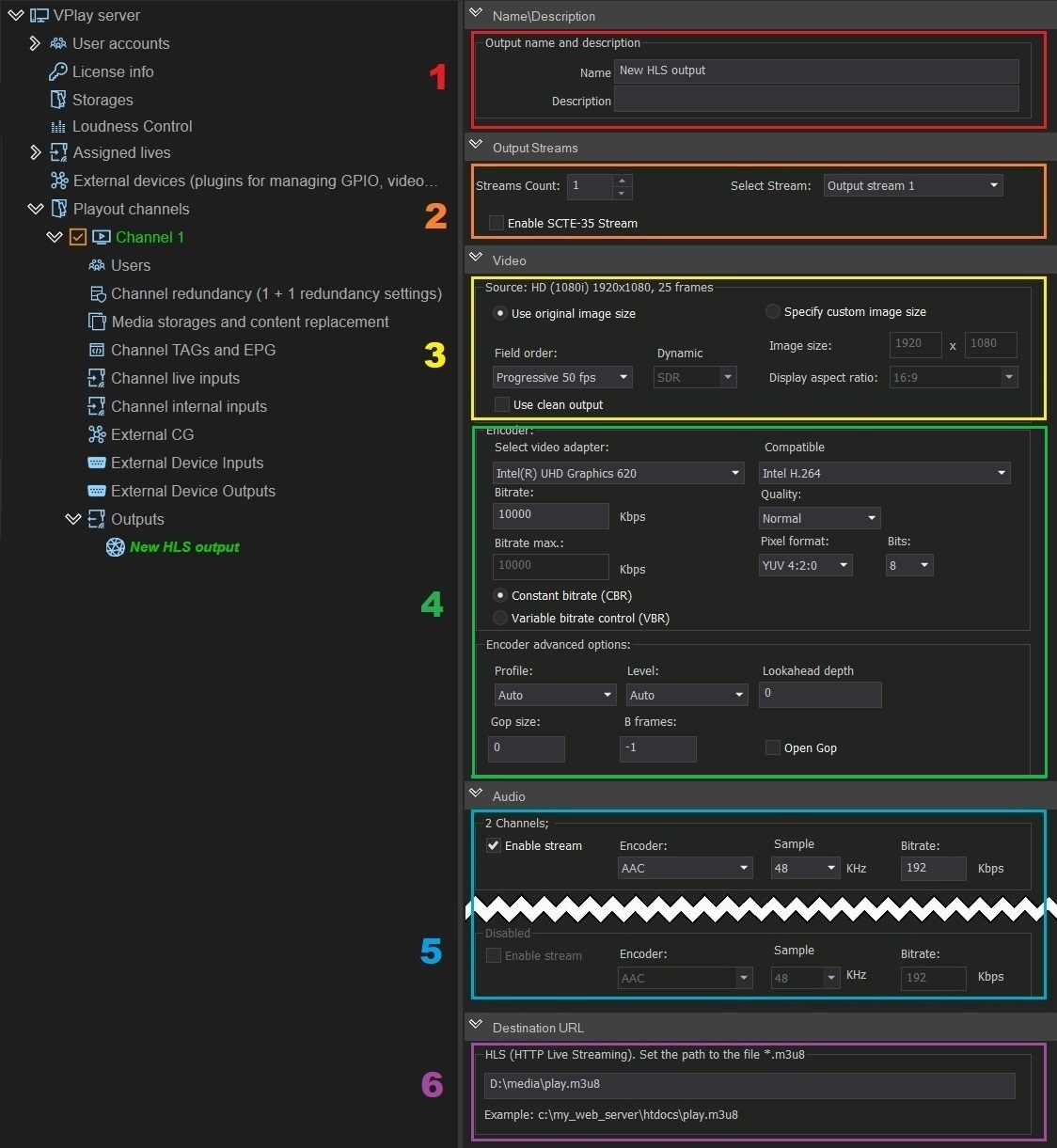
Adding: Add channel output → HLS (HTTP Live Streaming)
Specific parameters:
- Output Streams / Streams Count — the number of simultaneous HLS streams (bitrates for ABR). Set a separate Select Stream for each stream
- Enable SCTE-35 Stream — inserts ad markers into the HLS manifest
Destination: the HLS(HTTP Live Streaming). Set the path to the file *.m3u8 field — the path to a folder on the web server.
RTMP
Adding: Add channel output → RTMP
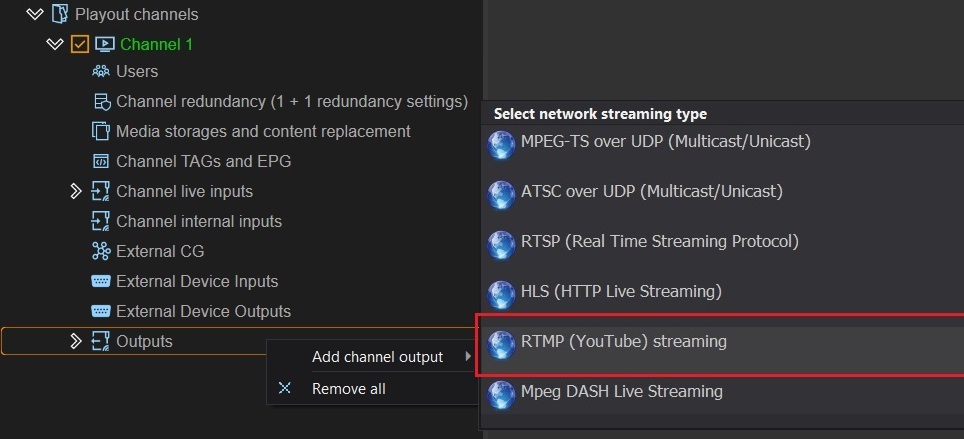
Adding: Add channel output → RTMP (YouTube) Streaming
The encoding parameters are common. Default field order: Progressive 50fps.
Destination URL: the RTMP(Real Time Streaming Protocol). Set the URL field — enter the RTMP URL of the platform.
YouTube Live
URL format: rtmp://a.rtmp.youtube.com/live2/[stream-key]
The key is available in YouTube Studio → Live streaming → Stream key.
Enable SCTE-35 Events — allows insertion of splice markers into the output stream.
MPEG-DASH
Adding: Add channel output → Mpeg DASH Streaming
The encoding parameters are common.
Destination: the Mpeg DASH Streaming. Set the path to the file *.mpd field — the path to the folder for manifest.mpd and segments.
SRT
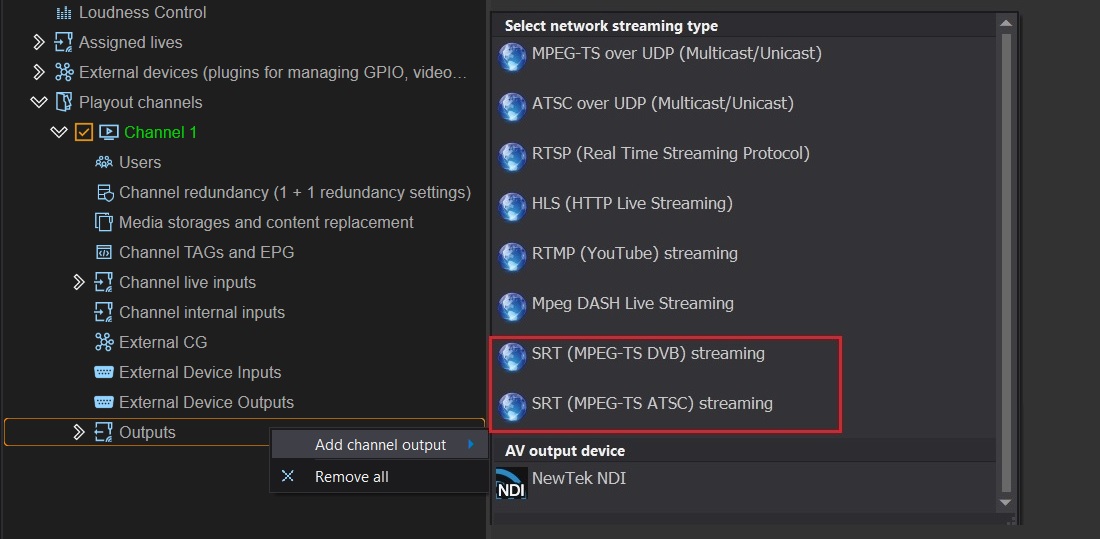
SRT (Secure Reliable Transport) — secure transmission over unreliable networks with automatic error correction.
Adding:
- SRT (MPEG-TS DVB) streaming — for DVB-compatible streams
- SRT (MPEG-TS ATSC) streaming — for ATSC
The encoding and Muxer parameters are the same as for UDP.
Caller / Listener modes
| Mode | Behavior |
|---|---|
| Caller | VPlay initiates a connection to the specified Listener. Broadcasting does not start until a point-to-point connection is established |
| Listener | VPlay waits for an incoming request. There can be several receiving endpoints (Callers) |
Destination SRT URL panel
- Set the URL — the stream address
- Encryption mode — AES-128 / AES-256 → the Generate button generates an encryption key (pass the key to the receiving side)
- Network mode — Caller or Listener
- Stream ID — a unique identifier (Caller mode only)
NDI
Adding: Add channel output → NDI
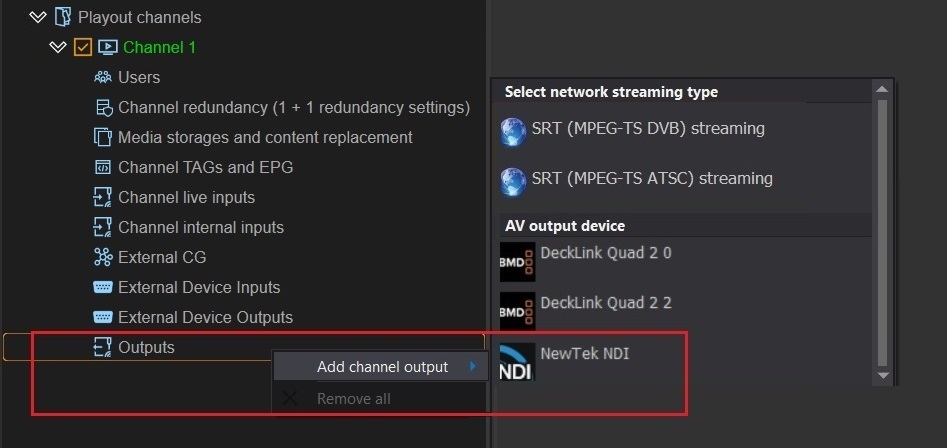
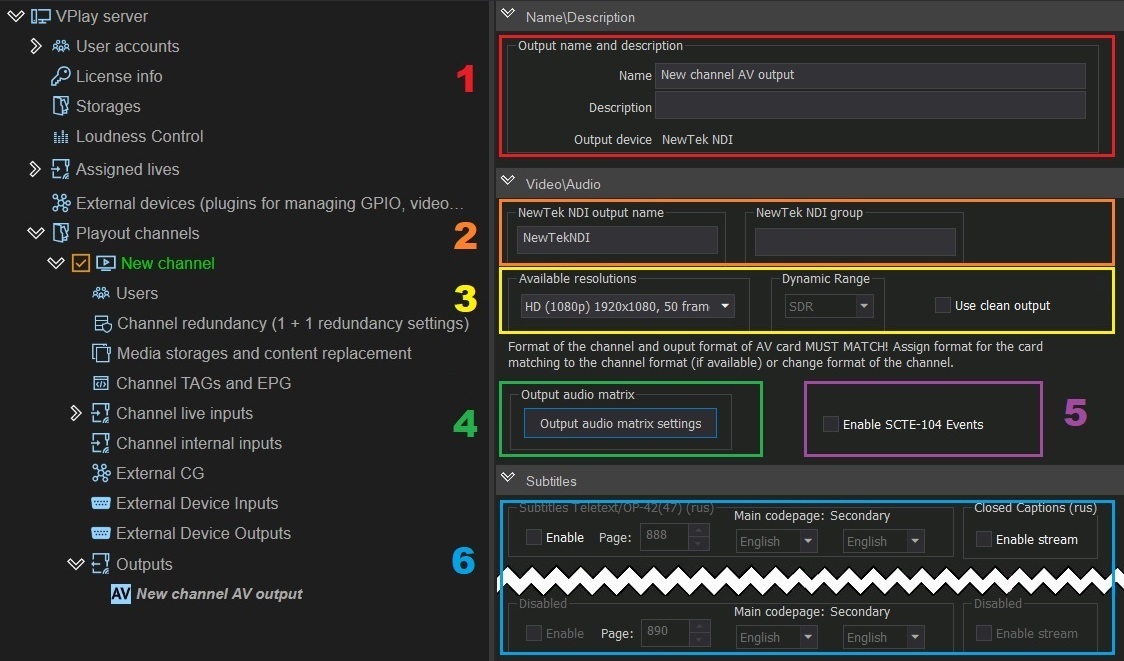
Adding: Add channel output → NDI
Specific parameters:
| Parameter | Description |
|---|---|
| NewTek NDI output name | Stream name in the NDI browser |
| NewTek NDI group | NDI group for organizing streams |
| Available resolutions | Resolution and fps of the NDI output; Downscale is possible |
| Output audio matrix | Up to 24 audio tracks, each configured independently |
| Enable SCTE-104 Events | Inserts SCTE-104 markers into the NDI stream |
| Subtitles | Closed Captions and teletext (OP-42/47): page (888 by default), language |
The NDI stream is automatically discovered by all NDI-compatible devices and software on the local network.
SDI
Adding: Add channel output → SDI → select a card
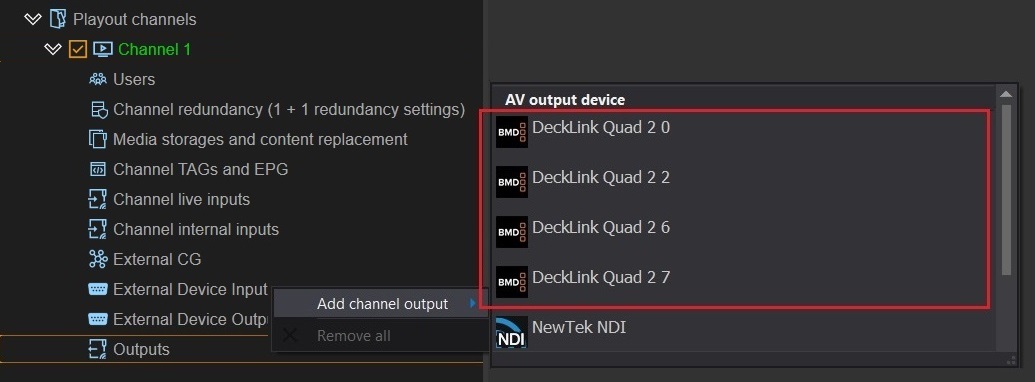
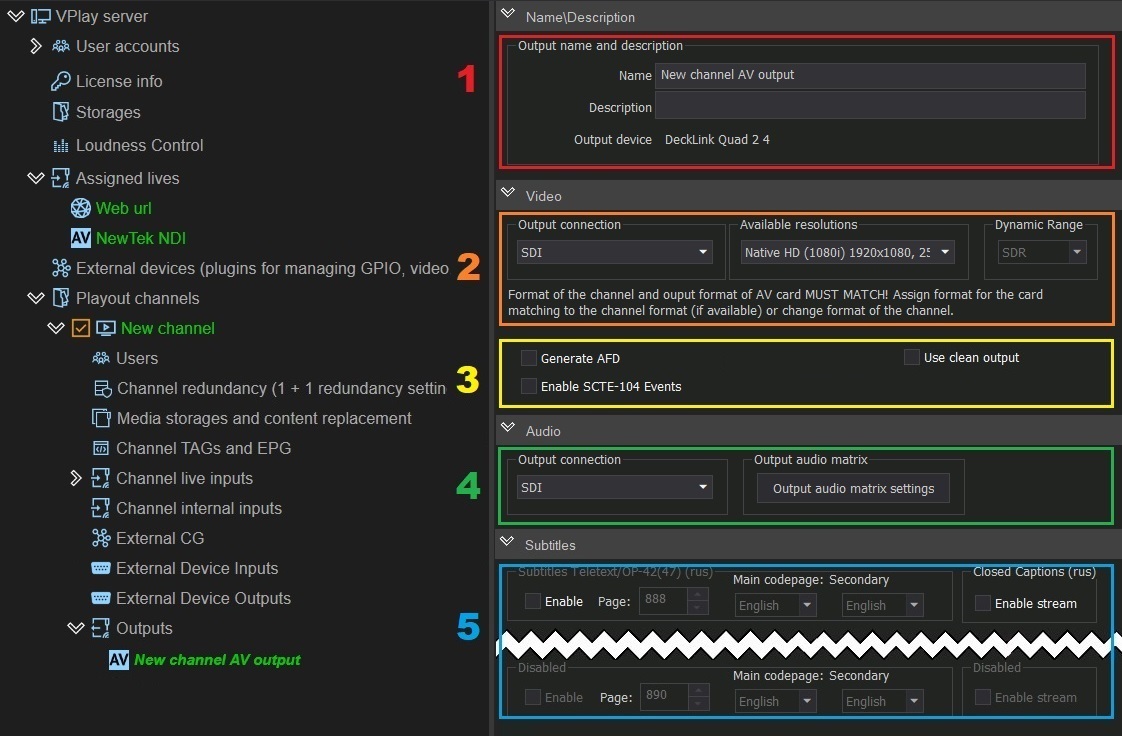
Adding: Add channel output → SDI → select a card and an output
Supported cards: StreamLabs MH4LM, DeckLink, AJA, DekTec, Softlab-NSK
SDI-specific parameters:
| Parameter | Description |
|---|---|
| Output connection | Output signal type (SDI) |
| Available resolutions | Resolution and fps; Downscale is possible |
| Generate AFD | Generates Active Format Description (aspect ratio information for SDI monitors) |
| Enable SCTE-104 Events | Inserts SCTE-104 markers into the SDI stream |
| Output audio matrix | Up to 24 audio tracks with individual configuration |
| Subtitles | Closed Captions and Teletext/OP-42(47): page 888 by default, language |
Monitoring outputs
The status of all outputs in vpControl:
- 🟢 Green — the stream is active, data is transmitted normally
- 🔴 Red — error: invalid configuration or no connection to the receiver
If the status is red, check the receiver IP/port, network availability, and codec compatibility with the receiver.